Teaching Assistant · Windows Utility
다운로드 파일 정리
1회 자동화
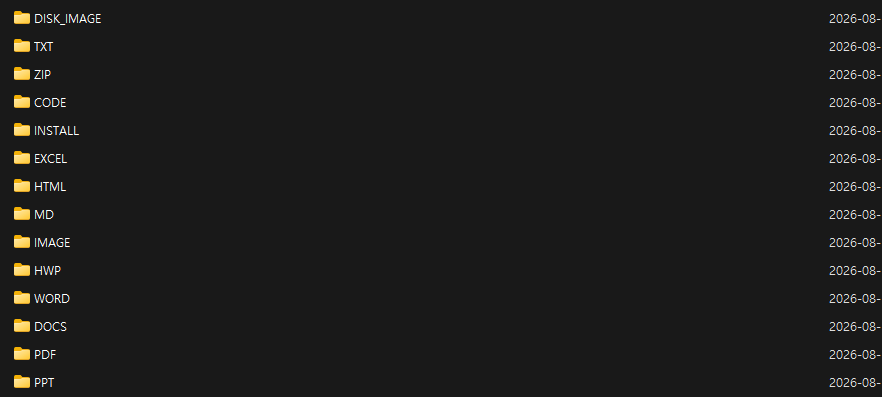
현재 Downloads 최상위의 기존 파일을 한 번 정리합니다. 예전 DOCS 폴더의 Word/HWP 파일도 각각 WORD/HWP로 다시 나눕니다.
$Download = (New-Object -ComObject Shell.Application).NameSpace('shell:Downloads').Self.Path

$Folders = [ordered]@{
    "PPT" = @(".ppt", ".pptx", ".pptm")
    "PDF" = @(".pdf")
    "WORD" = @(".doc", ".docx", ".docm")
    "HWP" = @(".hwp", ".hwpx")
    "EXCEL" = @(".xls", ".xlsx", ".xlsm", ".xlsb", ".csv")
    "IMAGE" = @(
        ".jpg", ".jpeg", ".png", ".gif", ".bmp",
        ".webp", ".tif", ".tiff", ".svg", ".heic", ".heif", ".ico"
    )
    "INSTALL" = @(
        ".exe", ".msi", ".msix", ".msixbundle",
        ".appx", ".appxbundle", ".apk"
    )
    "DISK_IMAGE" = @(".iso")
    "HTML" = @(".html", ".htm", ".xhtml", ".mht", ".mhtml")
    "ZIP" = @(
        ".zip", ".7z", ".rar", ".tar", ".gz", ".bz2", ".xz",
        ".tgz", ".tbz", ".tbz2", ".zst"
    )
    "MD" = @(".md", ".markdown")
    "TXT" = @(".txt")
    "CODE" = @(
        ".py", ".pyw", ".pyx", ".ipynb",
        ".c", ".h", ".cc", ".cpp", ".cxx", ".hpp", ".hh", ".hxx",
        ".java", ".kt", ".kts",
        ".js", ".jsx", ".mjs", ".cjs", ".ts", ".tsx",
        ".css", ".scss", ".sass", ".less",
        ".sh", ".bash", ".zsh", ".ps1", ".psm1", ".bat", ".cmd",
        ".rs", ".go", ".swift", ".rb", ".php", ".sql",
        ".asm", ".s", ".cu", ".cuh", ".m", ".r",
        ".cmake", ".gradle",
        ".json", ".yaml", ".yml", ".toml", ".ini", ".cfg", ".xml"
    )
}

$CodeFileNames = @(
    "Makefile",
    "makefile",
    "GNUmakefile",
    "CMakeLists.txt",
    "Dockerfile",
    "Containerfile"
)

function Get-UniqueDestination {
    param(
        [Parameter(Mandatory = $true)][string]$TargetDirectory,
        [Parameter(Mandatory = $true)][string]$FileName
    )

    $Destination = Join-Path $TargetDirectory $FileName

    if (-not (Test-Path -LiteralPath $Destination)) {
        return $Destination
    }

    $Base = [System.IO.Path]::GetFileNameWithoutExtension($FileName)
    $Ext = [System.IO.Path]::GetExtension($FileName)
    $Timestamp = Get-Date -Format "yyyyMMdd-HHmmssfff"

    if ([string]::IsNullOrEmpty($Ext)) {
        return (Join-Path $TargetDirectory "$FileName-$Timestamp")
    }

    return (Join-Path $TargetDirectory "$Base-$Timestamp$Ext")
}

function Move-FileToCategory {
    param(
        [Parameter(Mandatory = $true)][System.IO.FileInfo]$File,
        [Parameter(Mandatory = $true)][string]$Category
    )

    $Target = Join-Path $Download $Category
    $Destination = Get-UniqueDestination -TargetDirectory $Target -FileName $File.Name
    Move-Item -LiteralPath $File.FullName -Destination $Destination
}

# 분류 폴더를 먼저 모두 생성합니다.
foreach ($Folder in $Folders.Keys) {
    $Target = Join-Path $Download $Folder
    if (-not (Test-Path -LiteralPath $Target)) {
        New-Item -ItemType Directory -Path $Target | Out-Null
    }
}

# Downloads 최상위의 기존 파일을 한 번 분류합니다.
Get-ChildItem -LiteralPath $Download -File | ForEach-Object {
    $File = $_
    $Category = $null

    if ($CodeFileNames -contains $File.Name) {
        $Category = "CODE"
    }
    else {
        foreach ($Folder in $Folders.Keys) {
            if ($Folders[$Folder] -contains $File.Extension.ToLowerInvariant()) {
                $Category = $Folder
                break
            }
        }
    }

    if ($Category) {
        Move-FileToCategory -File $File -Category $Category
    }
}

# 예전 버전에서 만든 DOCS 폴더가 있으면 WORD / HWP로 재분류합니다.
$LegacyDocs = Join-Path $Download "DOCS"

if (Test-Path -LiteralPath $LegacyDocs) {
    Get-ChildItem -LiteralPath $LegacyDocs -File | ForEach-Object {
        $File = $_
        $Ext = $File.Extension.ToLowerInvariant()

        if (@(".doc", ".docx", ".docm") -contains $Ext) {
            Move-FileToCategory -File $File -Category "WORD"
        }
        elseif (@(".hwp", ".hwpx") -contains $Ext) {
            Move-FileToCategory -File $File -Category "HWP"
        }
    }

    # DOCS 폴더가 완전히 비었을 때만 제거합니다.
    if (-not (Get-ChildItem -LiteralPath $LegacyDocs -Force | Select-Object -First 1)) {
        Remove-Item -LiteralPath $LegacyDocs
    }
}

Write-Host ""
Write-Host "Downloads 파일 정리 완료."
Write-Host "분류 위치: $Download"
연속 자동화
한 번 실행하면 감시 스크립트를 설치하고 Windows 시작프로그램에 등록!! 이후 새로 다운로드되는 파일을 10분 주기로 자동 분류!!
$InstallDir = Join-Path $env:LOCALAPPDATA "DownloadOrganizer"
$WatcherPath = Join-Path $InstallDir "watch-downloads.ps1"
$StartupDir = [Environment]::GetFolderPath("Startup")
$LauncherPath = Join-Path $StartupDir "DownloadOrganizer.cmd"

New-Item -ItemType Directory -Path $InstallDir -Force | Out-Null

$WatcherScript = @'
$Download = (New-Object -ComObject Shell.Application).NameSpace('shell:Downloads').Self.Path

$Folders = [ordered]@{
    "PPT" = @(".ppt", ".pptx", ".pptm")
    "PDF" = @(".pdf")
    "WORD" = @(".doc", ".docx", ".docm")
    "HWP" = @(".hwp", ".hwpx")
    "EXCEL" = @(".xls", ".xlsx", ".xlsm", ".xlsb", ".csv")
    "IMAGE" = @(
        ".jpg", ".jpeg", ".png", ".gif", ".bmp",
        ".webp", ".tif", ".tiff", ".svg", ".heic", ".heif", ".ico"
    )
    "INSTALL" = @(
        ".exe", ".msi", ".msix", ".msixbundle",
        ".appx", ".appxbundle", ".apk"
    )
    "DISK_IMAGE" = @(".iso")
    "HTML" = @(".html", ".htm", ".xhtml", ".mht", ".mhtml")
    "ZIP" = @(
        ".zip", ".7z", ".rar", ".tar", ".gz", ".bz2", ".xz",
        ".tgz", ".tbz", ".tbz2", ".zst"
    )
    "MD" = @(".md", ".markdown")
    "TXT" = @(".txt")
    "CODE" = @(
        ".py", ".pyw", ".pyx", ".ipynb",
        ".c", ".h", ".cc", ".cpp", ".cxx", ".hpp", ".hh", ".hxx",
        ".java", ".kt", ".kts",
        ".js", ".jsx", ".mjs", ".cjs", ".ts", ".tsx",
        ".css", ".scss", ".sass", ".less",
        ".sh", ".bash", ".zsh", ".ps1", ".psm1", ".bat", ".cmd",
        ".rs", ".go", ".swift", ".rb", ".php", ".sql",
        ".asm", ".s", ".cu", ".cuh", ".m", ".r",
        ".cmake", ".gradle",
        ".json", ".yaml", ".yml", ".toml", ".ini", ".cfg", ".xml"
    )
}

$CodeFileNames = @(
    "Makefile",
    "makefile",
    "GNUmakefile",
    "CMakeLists.txt",
    "Dockerfile",
    "Containerfile"
)

$CreatedNew = $false
$Mutex = New-Object System.Threading.Mutex($true, "Local\DownloadOrganizerWatcher", [ref]$CreatedNew)
if (-not $CreatedNew) {
    exit
}

function Get-UniqueDestination {
    param(
        [Parameter(Mandatory = $true)][string]$TargetDirectory,
        [Parameter(Mandatory = $true)][string]$FileName
    )

    $Destination = Join-Path $TargetDirectory $FileName
    if (-not (Test-Path -LiteralPath $Destination)) {
        return $Destination
    }

    $Base = [System.IO.Path]::GetFileNameWithoutExtension($FileName)
    $Ext = [System.IO.Path]::GetExtension($FileName)
    $Timestamp = Get-Date -Format "yyyyMMdd-HHmmssfff"

    if ([string]::IsNullOrEmpty($Ext)) {
        return (Join-Path $TargetDirectory "$FileName-$Timestamp")
    }

    return (Join-Path $TargetDirectory "$Base-$Timestamp$Ext")
}

function Get-Category {
    param([Parameter(Mandatory = $true)][System.IO.FileInfo]$File)

    if ($CodeFileNames -contains $File.Name) {
        return "CODE"
    }

    foreach ($Folder in $Folders.Keys) {
        if ($Folders[$Folder] -contains $File.Extension.ToLowerInvariant()) {
            return $Folder
        }
    }

    return $null
}

function Initialize-CategoryFolders {
    foreach ($Folder in $Folders.Keys) {
        $Target = Join-Path $Download $Folder
        if (-not (Test-Path -LiteralPath $Target)) {
            New-Item -ItemType Directory -Path $Target | Out-Null
        }
    }
}

function Move-LegacyDocs {
    $LegacyDocs = Join-Path $Download "DOCS"
    if (-not (Test-Path -LiteralPath $LegacyDocs)) {
        return
    }

    Get-ChildItem -LiteralPath $LegacyDocs -File -ErrorAction SilentlyContinue | ForEach-Object {
        $File = $_
        $Ext = $File.Extension.ToLowerInvariant()
        $Category = $null

        if (@(".doc", ".docx", ".docm") -contains $Ext) {
            $Category = "WORD"
        }
        elseif (@(".hwp", ".hwpx") -contains $Ext) {
            $Category = "HWP"
        }

        if ($Category) {
            $Target = Join-Path $Download $Category
            $Destination = Get-UniqueDestination -TargetDirectory $Target -FileName $File.Name
            try {
                Move-Item -LiteralPath $File.FullName -Destination $Destination -ErrorAction Stop
            }
            catch {
                # 다음 주기에 다시 시도합니다.
            }
        }
    }

    if (-not (Get-ChildItem -LiteralPath $LegacyDocs -Force -ErrorAction SilentlyContinue | Select-Object -First 1)) {
        Remove-Item -LiteralPath $LegacyDocs -ErrorAction SilentlyContinue
    }
}

function Organize-Downloads {
    Initialize-CategoryFolders
    Move-LegacyDocs

    Get-ChildItem -LiteralPath $Download -File -ErrorAction SilentlyContinue | ForEach-Object {
        $File = $_
        $Category = Get-Category -File $File

        if (-not $Category) {
            return
        }

        $Target = Join-Path $Download $Category
        $Destination = Get-UniqueDestination -TargetDirectory $Target -FileName $File.Name

        try {
            Move-Item -LiteralPath $File.FullName -Destination $Destination -ErrorAction Stop
        }
        catch {
            # 브라우저가 다운로드를 완료하지 않아 파일이 잠겨 있으면
            # 다음 10분 주기에서 자동으로 다시 시도합니다.
        }
    }
}

try {
    while ($true) {
        Organize-Downloads
        Start-Sleep -Seconds 600
    }
}
finally {
    if ($Mutex) {
        try { $Mutex.ReleaseMutex() } catch {}
        $Mutex.Dispose()
    }
}
'@

Set-Content -LiteralPath $WatcherPath -Value $WatcherScript -Encoding UTF8

$Launcher = @"
@echo off
start "" powershell.exe -NoProfile -WindowStyle Hidden -ExecutionPolicy Bypass -File "$WatcherPath"
"@

Set-Content -LiteralPath $LauncherPath -Value $Launcher -Encoding ASCII

# 설치 직후 바로 실행합니다.
Start-Process powershell.exe `
    -ArgumentList "-NoProfile -WindowStyle Hidden -ExecutionPolicy Bypass -File `"$WatcherPath`"" `
    -WindowStyle Hidden

Write-Host ""
Write-Host "연속 자동 분류 설치 완료."
Write-Host "감시 스크립트: $WatcherPath"
Write-Host "자동 시작 등록: $LauncherPath"
Write-Host "Windows 로그인 후에도 자동으로 계속 실행됩니다."
정리 결과 예시